How to work with filing at AU
This page describes how to work with filing at AU. This includes:
- Responsibilities of the employee and the manager in relation to filing
- How frameworks and principles are translated into a specific registration practice in daily work
- The scope of filing
- How the work on supporting and developing filing efforts is organised in a programme with a steering committee
Filing responsibility
Filing responsibility
The employee
The individual employee is responsible for ensuring that all case-relevant material received/sent/created is processed and filed in Workzone in accordance with the filing practice of the area.
If several employees work together on a task, they must agree who will do the filing. The same applies if a task consists of several sub-tasks divided between different employees or different levels in the organisation.
AU applies the single-case principle, and therefore several cases may be linked to the same task/project. As an employee, you are responsible for keeping track of the cases and documents for which you are responsible.
Managers at AU
The managers in the individual areas are responsible for ensuring that filing is in accordance with legislation, and that a filing practice is established for the case portfolio of the area, based on the overall frameworks and guidelines.
The managers are responsible for ensuring that the employees of the area are instructed in the filing practice and that this practice is followed.
The manager is therefore responsible for data quality as well as integrity and confidentiality of the data stored by the manager’s area in Workzone.
From framework and principles to registration practice
From framework and principles to registration practice
Filing framework
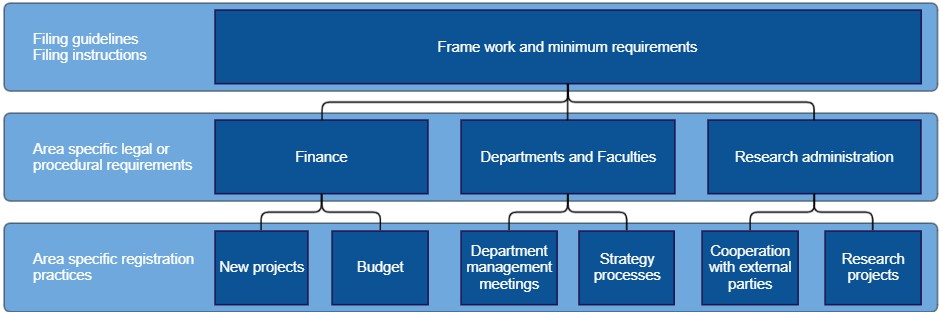
The overall framework for filing is described in these filing guidelines.
As a general rule, the framework cannot stand alone, as the individual areas may have specific legal or procedural requirements that entail a need to supplement the overall framework with a more detailed registration practice.
This may be due to:
- Requirements for documentation in connection with research collaborations with external parties
- Stricter requirements for documentation in connection with cases in the environmental area
- Stricter requirements in relation to documentation of EU projects in the financial area
- Needs for management information in connection with decision practices for dispensations in the education area
Local practice
To support work on definition, description and system support for the area-specific requirements, the different areas have superuser groups who coordinate across the area and develop registration practices on the basis of specific knowledge about needs, legislation and processes within the framework of the filing guidelines.
The group's job is not to be experts on all practices and processes, but the group will work on how this can be supported in Workzone. If the superuser group needs help in connection with legal clarification, the group can contact the superuser group for the relevant area or HR Data and Digitalisation, who can provide a contact.
This could be:
- A faculty in which the superuser group describes how best to handle research administration in Workzone; or processes for how consultations are handled in Workzone
- In the financial area, where the superuser group describes how research funding is best handled in Workzone
- Or in the education area, where the superuser group describes and defines how new requirements in connection with the study progress reform are to be documented and handled in Workzone
The figure below shows an example of the relationship between the overall framework and the administrative-specific registration practice in the administrative areas Finance, department/school secretariats and dean’s secretariats as well as research administration.
The scope of filing
The scope of filing
AU's activities are extensive and complex, and therefore contact a superusers and superuser groups within the individual areas for a more specific definition of what is to be filed. The guidelines for filing are stated below.
Scope of filing
Documents are filed on cases. A case constitutes documentation of administrative case processing in connection with AU's activities, where there is either an obligation or a need to file.
The scope of filing for each case type, i.e. which documents should, as a minimum, be added to a case, is assessed by the superusers in the areas/units/teams that typically process such cases. This could be whether drafts or email correspondence concerning a presentation should be added to a committee meeting case, or whether the final presentation is sufficient. As a rule, all correspondence with external parties should be filed.
If you are in doubt as to whether a specific case should be filed or not, you can clarify this by involving your local superuser, who can get help from HR Data and Digitisation.
Documents on the case
The documents of the case are documentation of the situation – rather than actual documents. This means that all documentation important to a case must be filed, irrespective of format (e.g. MS Office documents, emails, text messages, photos, maps or telephone memos).
Parties to the case
All correspondence with external parties must be linked to a party.
Exempt from filing
Some of the documentation that occurs in connection with the practical operation of the university must not be filed in Workzone. For example, this applies to the actual conduct of research (research data), teaching, cleaning, building operations, cafeteria operations, department/school-specific holiday plans, etc.
Case material is exempt from filing if it is stored in a system with a submission agreement with the Danish National Archives or if there is an integration with Workzone. The system owner can provide information about whether the system’s data is submitted to the Danish National Archives. A system could be STADS in the education area or Emply in HR.
Note that folders in Outlook, private drives, shared drives, Onedrive, Office 365 Teams, USB flash drives, etc. are NOT approved systems. Case-relevant emails and documents from these drives should therefore also be stored in Workzone if they fall under the filing obligation or filing need.
Do you have any questions?
If you are in doubt as to whether a specific case should be filed or not, you can clarify this by involving your local superuser, who can get help from HR Data and Digitalisation.
