Indoor climate and ergonomics
The indoor climate is an important part of the overall work environment. A good indoor climate with an appropriate temperature and clean, fresh air has a positive impact on your well-being. A poor indoor climate, however, may cause discomfort, headache and concentration problems.
In working with a good indoor climate you will come far with:
- Keeping the temperature at approx. 20-22 °C
- Keeping the room clean and tidy
- Airing regularly
The Danish Working Environment Authority has developed a guide on the conditions, which influence and improve indoor climate.
At godtarbejdsmiljo.dk, you can find more information about e.g. noise, lighting, temperature and air quality (in Danish).
On the Danish Working Environment Authority’s webpage about the workplace, you will find questions and answers relating to the working environment (in Danish).
Ergonomics and layout
Ergonomics and layout
A good ergonomic working environment can reduce the risk of developing pain in the arms, neck, shoulders and back.
When you spend many hours a day at a screen-based workstation, it is important that it is properly set up. At godtarbejdsmiljo.dk, you'll find guidelines on how to arrange an office workstation, focusing on the importance of varying working postures and organising the workspace sensibly in order to achieve and maintain a healthy working environment when using a screen. The guidance includes advice on office chairs, desks, screens, document holders, keyboards, computer mice, software, laptops, screen glasses, etc.
AU HR has also produced a quick guide to the office workstation.
Here is the Danish Working Environment Authority’s guidance on screen work (only in Danish).
Find more information at godtarbejdsmiljo.dk.
Ergonomics - variation and movement
Ergonomics - variation and movement
Variation is the key to preventing pain
Screen work and sedentary tasks can be demanding on the body and may result in pain. Although a good sitting posture and a properly adjusted workstation can reduce discomfort and strain, this is rarely sufficient to prevent pain, as the body is designed to move. Therefore, variation in working postures and movement throughout the day is the most important tool for ensuring a good ergonomic working environment.
The most important rule of ergonomics: the next position is the best position.
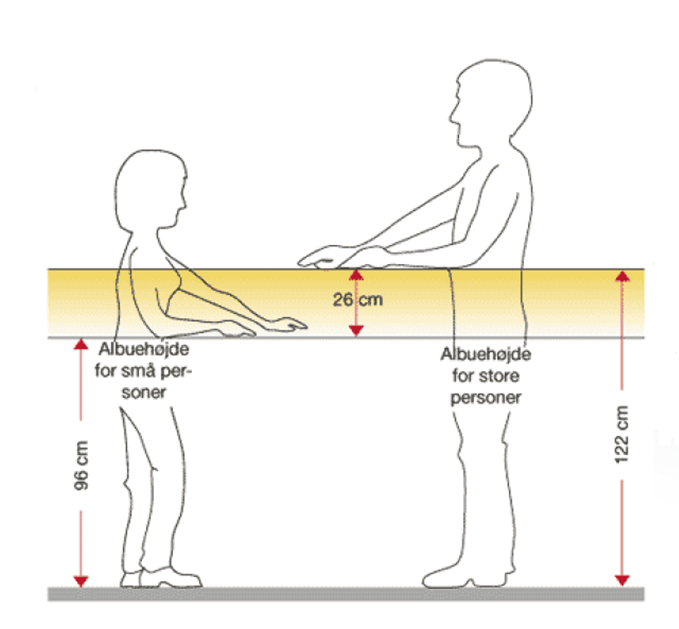
A simple way to introduce variation in working postures is to alternate between sitting and standing, if you have a height-adjustable desk.
At godtarbejdsmiljo.dk, you'll find materials to inspire greater physical variation and movement in everyday life (in Danish).
Strengthen unity and wellbeing through movement
Movement during the working day can form part of a health-promoting initiative that helps prevent pain and reduce sickness absence. Regular short exercises and group training sessions during the working day are recommended, as they can improve both health and team cohesion.
Here are examples of short exercises that can be carried out during the working day. Also consider using “walk and talk” meetings where possible, organising group walks such as AUminoen (in Danish), doing planks together, etc.
You are also encouraged to include movement and physical activity in your leisure time. Even a small number of exercises can make a difference in preventing pain.
Open-plan offices
Open-plan offices
Open-plan offices, where, for example, four or more people work in the same space, place considerable demands on the working environment, both physical and psychological. Even relatively minor impacts from a poor indoor climate can significantly reduce productivity in an office setting. Working in open-plan offices therefore requires particular attention to acoustics, layout, choice of materials and technical equipment. In addition, colleagues’ conversations, phone calls and noise from keyboards, printers and photocopiers can affect concentration.
Find guides, knowledge and inspiration for open-plan offices at the BFA (in Danish).
Sound, noise and acoustics
Sound, noise and acoustics
Sound, noise and acoustics have great influence on the working environment and may result in tiredness, concentration problems and headaches.
It is individual when sounds are perceived as noise, but under the Danish Health and Safety at Work Act, nobody is subjected to noise exposure of more than 85 dB(A). If the noise exceeds 80 dB(A) ear protection must be available.
Light
Light
- Lighting is an essential part of the working environment. If artificial and natural lighting are not suited to the nature of the work and the employee’s needs, this can lead to work-related discomfort such as fatigue, visual strain and headaches. Working postures may also become awkward, resulting in problems with the shoulders, back and neck.
- When working at a computer, the positioning of the screen and artificial light sources must be coordinated to ensure sufficient lighting while avoiding glare and reflections on the screen.
Screen
Screen
- The characters on the screen must be clear and sufficiently large.
- Brightness and contrast must be easy to adjust and set according to external conditions.
- The employee must be able to swivel and tilt the screen to suit their needs. A separate monitor stand or an adjustable desk may be used to ensure the height can be adapted to the individual employee.
- Glare and disturbing reflections on the screen must be avoided, for example by positioning the screen sideways to incoming light.
Work desk
Work desk
The desk must have a low-reflective surface.
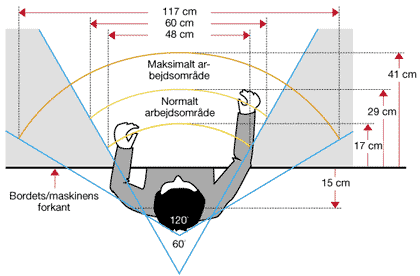
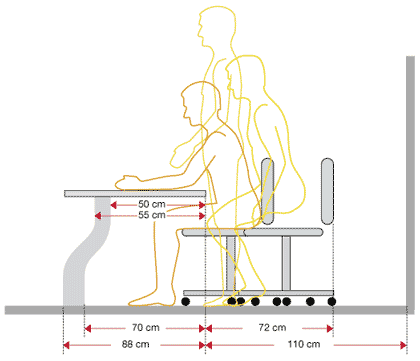
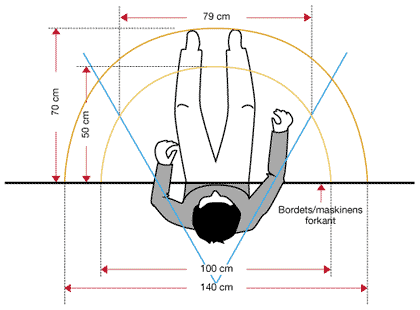
There must be sufficient space on and under the desk to allow the employee to adopt appropriate working postures and movements.
Suitable working postures and movements require that the sitting and working height of the desk is arranged to suit both the individual employee and the tasks being performed.
The desk must be sufficiently wide and deep to allow a flexible arrangement of the screen, keyboard, documents and other equipment.
The depth of the desk must allow the screen to be positioned at an appropriate viewing distance, while also providing space to rest or support the hands and forearms in front of the keyboard.
There is no requirement for a height-adjustable desk.